Easier than it sounds
You may come across a situation where you must change the linux password of a user be it root or any other. Luckily , the process is rather simple and easy to do.
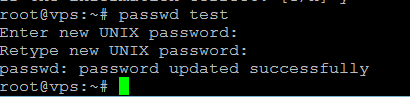
First step is to connect to the VPS or Linux machine with the root account via your desired SSH client and run the following command:
passwd user
After pressing enter, you will be prompted to insert the new password twice. Make sure you typed it correctly, twice.
If you wish to change the password for the root account, make sure you are logged in as root and simply type:
passwd
Insert the password twice in order to change it.

Enjoy!